


Author: Stewart Berry
Maptitude, a G2 Leader in Enterprise and Small Business Location Intelligence, maps your business data with built-in demographics, territories, drive-time rings, and routing, for a fixed $795 a year
29 September 2026
In 2026, location intelligence software continues to play a vital role in how businesses turn addresses, coordinates, and spatial data into practical business answers: Where should we open the next store? Which routes are most efficient? Where are we overserved or under-served?
Location intelligence platforms range from full GIS systems to lightweight web tools and developer APIs. With the multitude of options now available, choosing the right one can be a challenge. Before deciding, you should evaluate which features are offered, the pricing, and any advantages or disadvantages.
This page compares 10 location intelligence platforms. Each one links to its own independent profile, alongside buttons that run a comparison against Maptitude on the AI tool of your choice. We will start by explaining what location intelligence software is and the key features that define a strong tool. Or use the table of contents to skip straight to the platforms.
In this article:
What Is Location Intelligence Software?
Key Features of Location Intelligence Software
10 Location Intelligence Software Tools Compared for 2026
What Teams Use Location Intelligence Software For
Which Location Intelligence Software Is Right for Your Business?
Location intelligence is a form of business intelligence where the dominant dimension used for analysis is location or geography. Location intelligence software combines geographic and GIS data with business information to uncover meaningful patterns, most often by viewing data points on an interactive map.
It adds spatial analysis to business data. Clustering, territory management, and proximity calculations help organizations identify trends that traditional analytics often overlook.
It covers the whole workflow. Typical location intelligence tools geocode business data, aggregate it to areas such as postal codes, find hot spots, locate facilities, and analyze demographics.
It is used across industries. Retail, logistics, finance, real estate, and government teams use location intelligence software to make smarter decisions, improve operational efficiency, and identify growth opportunities.
We have been selling mapping software for forty years. These are the questions that come up every time. Ask them about every tool you look at, including Maptitude.
Here are 10 location intelligence platforms, each with a link to its independent profile and AI comparison tools so you can evaluate it against Maptitude yourself.
Maptitude is a full-featured mapping software and location intelligence platform, combining a powerful Windows desktop GIS with Maptitude Online for web-based sharing and analytics.
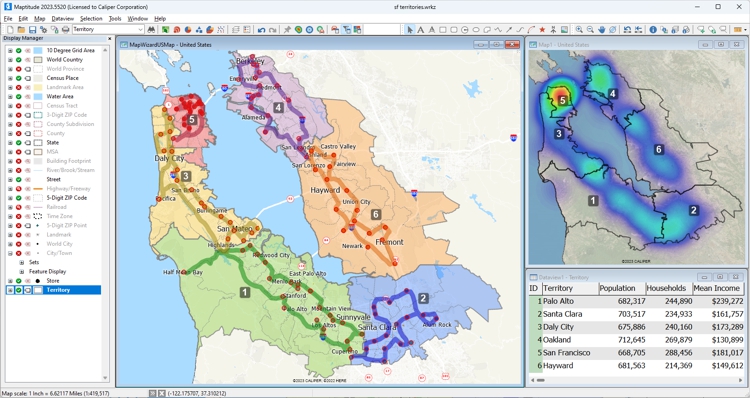
Territories, optimized routing, density “hot spots”, and relational database analysis in Maptitude GIS
Third-party recognition. In the G2 Summer 2026 reports, Maptitude earned Leader status in Location Intelligence, including the Enterprise and Small Business segments, and was named a High Performer in Location Intelligence, including the Americas regional reports. It held Leader status in Location Intelligence in the Winter 2026 reports as well, and is also a Leader in GIS across the overall, Enterprise, Mid-Market, and Small Business segments. Maptitude is rated 4.7 out of 5 from 150 verified reviews on G2, and named a Top Software Product in the G2 2026 Best Software Awards, placing in the top 0.63% of all vendors. G2 reviewers rate Maptitude support 9.2 out of 10. Maptitude developer Caliper Corporation was named to the Geoawesome Global Top 100 Geospatial Companies, 2026 Edition. Maptitude has also been named a Champion by Info-Tech Research Group and SoftwareReviews, and recognized by Gartner Digital Markets across Capterra, Software Advice, and GetApp. See all Maptitude awards.


Maptitude G2 badges in Location Intelligence, Summer 2026
Maptitude location intelligence features:
In 2026, Maptitude introduced:
See the full Maptitude 2026 feature list for detail.
Pricing. Maptitude costs a fixed $795 a year per user, with one-time purchase and subscription options, including one free Country Package. There are no per-API-call fees for desktop work. Maptitude Online is available as an additional subscription.
Maptitude offers a free, no risk, 1-month trial with no credit card required, so you can start mapping now.
Use the buttons below to get an independent AI comparison of Maptitude and Maptitude Online against the other platforms on this page:

|
“We've been using Maptitude for more than 20 years. It is by far 'the best bang for the buck' in GIS software. I can't believe the amount of demographic data that comes with the product. The sophistication is incredible, but the software is relatively simple to use. We've been using Maptitude to map our CRA Assessment Areas for banks. We also use it for branch impact studies (required by regulators). When we started using drive-time rings to determine the practical service area of bank branches the regulators were really impressed.”
|

|
“When we are helping financial institutions create and define geographically targeted market segments, HMDA and CRA Small Business analysis, loan trends, Competitive Analysis, market share, Business and Deposit trends - our tool of choice is Maptitude. It is one of the most affordable and feature-packed desktop GIS software in the market. It comes bundled with all the Census and other spatial data related to the financial service industry.”
|

|
“I discovered Maptitude in 1995 when it was first released and have used it exclusively in my health/hospital planning career. It has been indispensable in terms of product quality, affordability and ease of use. I was able to make a variety of custom maps of hospital patient data for executive-level decision support.”
|

|
“Easy to use and affordable. No need to upload information or customer database. All Info stays on your computer and not on the cloud.”
|
Maptitude Online map of population density by ZIP Code and 30-minute proximity to major U.S. airports
Maptitude Desktop Free Trial Maptitude Online Free Trial
Source: Wikipedia – Carto
See Wikipedia for a current description of Carto.
For a current, independent description of Carto, see their profile on G2, and compare it to Maptitude: g2.com/compare/maptitude-vs-maptitude-online-vs-carto →
Use the buttons below to get an independent AI comparison of Maptitude vs Carto:
For a current, independent description of eSpatial, see their profile on G2, and compare it to Maptitude: g2.com/compare/maptitude-vs-maptitude-online-vs-espatial →
Use the buttons below to get an independent AI comparison of Maptitude vs eSpatial:
Source: Wikipedia – Esri ArcGIS
See Wikipedia for a current description of Esri ArcGIS.
For a current, independent description of Esri ArcGIS, see their profile on G2, and compare it to Maptitude: g2.com/compare/maptitude-vs-maptitude-online-vs-esri-arcgis →
Use the buttons below to get an independent AI comparison of Maptitude vs Esri ArcGIS:
For a current, independent description of Geoblink, see their profile on G2, and compare it to Maptitude: g2.com/compare/maptitude-vs-maptitude-online-vs-geoblink →
Use the buttons below to get an independent AI comparison of Maptitude vs Geoblink:
For a current, independent description of Google Earth Engine, see their profile on G2, and compare it to Maptitude: g2.com/compare/maptitude-vs-maptitude-online-vs-google-earth-engine →
Use the buttons below to get an independent AI comparison of Maptitude vs Google Earth Engine:
Source: Wikipedia – Mapbox
See Wikipedia for a current description of Mapbox.
For a current, independent description of Mapbox, see their profile on G2, and compare it to Maptitude: g2.com/compare/maptitude-vs-maptitude-online-vs-mapbox →
Use the buttons below to get an independent AI comparison of Maptitude vs Mapbox:
Source: Wikipedia – MapInfo Pro
See Wikipedia for a current description of MapInfo Pro.
For a current, independent description of MapInfo Pro, see their profile on G2, and compare it to Maptitude: g2.com/compare/maptitude-vs-maptitude-online-vs-mapinfo-pro →
Use the buttons below to get an independent AI comparison of Maptitude vs MapInfo Pro:
Source: Wikipedia – QGIS
See Wikipedia for a current description of QGIS.
For a current, independent description of QGIS, see their profile on G2, and compare it to Maptitude: g2.com/compare/maptitude-vs-maptitude-online-vs-qgis →
Use the buttons below to get an independent AI comparison of Maptitude vs QGIS:
For a current, independent description of Smappen, see their profile on G2, and compare it to Maptitude: g2.com/compare/maptitude-vs-maptitude-online-vs-smappen →
Use the buttons below to get an independent AI comparison of Maptitude vs Smappen:
These are common reasons organizations buy location intelligence software, with results reported by Maptitude customers:
Open-source mapping tools such as QGIS can be powerful, and many organizations use them effectively. However, they do not come with the commercial infrastructure that Maptitude provides as standard: a full-time development team with over 40 years of GIS experience, dedicated support staff rated 9.2 out of 10 for Quality of Support by G2 reviewers, commercial-grade demographic and business data, free training, and a fixed annual subscription that covers all updates and support with no added costs.
The right choice depends on whether you need deep analysis, embedded maps, or quick business answers. Start by clarifying your core needs (territories, routes, site selection, network optimization) and then match them to the platform that best fits your data, skills, and deployment preferences.
For those seeking location intelligence software that stands out in both analytical depth and affordability, Maptitude costs $795 and is packaged as a one-stop solution, shipping with all the tools and data required to investigate business performance, including extensive demographics, consumer segmentation data, and address and postal geocoding.
Use the AI comparison buttons above to compare Maptitude with any platform on this page.

|
“I've been using Maptitude for more than 15 years. It is simply the best tool available for businesses that need a market planning mapping and data resource. It can do everything I need it to do - from the very simple to the complex. It integrates nicely with other programs and file types making analysis and presentation very easy. I highly recommend Maptitude to firms who need a function-rich GIS mapping solution. It is the best!”
|

|
“Pros: Cost. Much easier to reach a purchasing decision. I loved the integrated country data package so I didn't have to download census layers and other info - it was all built in.”
|
Learn more about Maptitude location intelligence software to see how you and your team can benefit!
Schedule a Free Personalized Demo
If you want rich analysis without coding, Maptitude is a good starting point: it provides guided workflows and built-in data. Maptitude Create-a-Map Wizard mapping technology takes you from a spreadsheet to a finished map in a few steps, and free tutorials, training, and webinars are available if you want them.
Maptitude supports fully offline mapping and analysis with local data,1 making it suitable for secure or low-connectivity environments. It runs as a desktop application whether or not you are connected to the Internet, which reduces the risk of exposing your databases and allows use in the field. When connected to the Internet, the same desktop software adds imagery from web map services, queries web services such as Google, Microsoft Bing, HERE, and what3words for geocoding and real-time travel times using your own API key, and publishes maps to Maptitude Online. Use the AI comparison buttons beside each platform on this page to check the others.
Maptitude includes detailed Country Packages with demographics and business data, such as U.S. Census and ACS data. One Country Package is included free with every license, and additional packages are available.
For sales-focused use cases, Maptitude offers territory management and routing tools: complex territory balancing and field-sales routing on the desktop, and lighter-weight territory and route planning in Maptitude Online, a pure web environment. The 2026 G2 buyer's guide to the best GIS software names Maptitude best for territory mapping and demographic analysis.
Maptitude costs $795 per user per year, available as a subscription or a one-time purchase, including a free Country Package, geocoding, and all updates and support, with no per-API-call fees for desktop work. When comparing tools, check whether they charge per geocode, per API call, or per data credit, because those charges increase costs.
Consider your primary use cases (sales, logistics, retail expansion, environmental analysis), your team's data and GIS skills, and how much you need built-in data versus warehouse integration. Also compare deployment (offline desktop versus SaaS), licensing model (per-user versus usage-based APIs), and how easily the tool integrates with your CRM, BI, or data stack. Or use the AI comparison buttons beside any platform on this page to check it against your own requirements.

 Check out our G2 Reviews
1 The default Maptitude installation uses a software key that performs periodic online license validation, and some features such as online background imagery need a connection. Fully air-gapped configurations, with manual activation and no online license check-ins, are available on request for free through Maptitude support. In both configurations, all mapping functions (geocoding, routing, drive-time analysis, demographic queries) run locally on the user's computer.
Third-party trademarks are used for identification and descriptive purposes and do not imply affiliation or endorsement. See Third-Party Trademarks.


Home | Products | Contact | Secure Store
 Call Us

