


Author: Stewart Berry
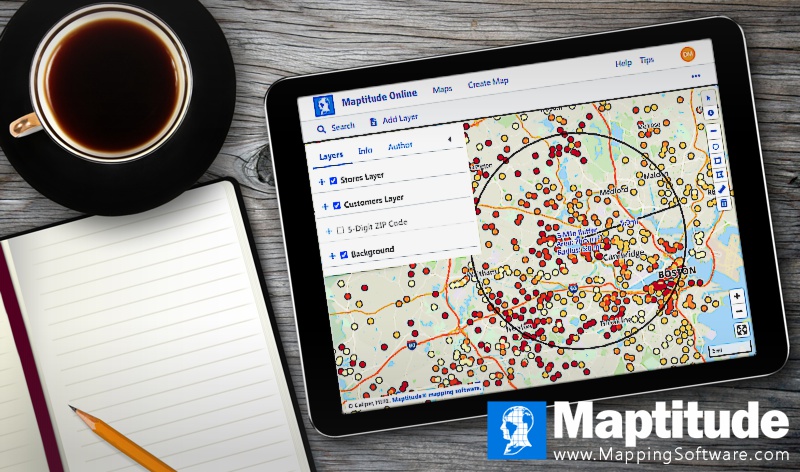
Maptitude, a G2-designated Leader in GIS, gives you a full map drawing toolkit, with full style control, at a fixed price of $795 a year
12 October 2026
In 2026, map drawing software has evolved with new tools prioritizing customization, usability, and advanced data visualization. From professional cartography to hobbyist projects, the latest advancements empower users to create visually compelling maps that meet diverse needs.
Maps are invaluable as an intuitive data visualization. When customization is needed, drawing tools are essential for helping communicate the business data contained in your maps. Drawing tools allow you to directly edit your maps. You may need to add a legend with a north arrow, draw pointers with text to identify important sites, add a title, manually add pushpins, show lengths and areas, edit circles/radii, or make any other number of stylistic changes.
But which application has the strongest toolset for map customization? This page compares 10 map drawing platforms, plus four more worth knowing about. Each one links to its own independent profile, alongside buttons that run a comparison against Maptitude on the AI tool of your choice. Or use the table of contents to skip straight to the platforms.
In this article:
Key Features of Map Drawing Software
10 Map Drawing Software Platforms Compared for 2026
What Teams Use Map Drawing Software For
Map drawing software covers two different jobs, and they behave differently. Freehand drawing adds text, symbols, lines, circles, rectangles, and other graphics over your map. Layer editing changes the geography itself, by adding, deleting, or reshaping the features in a geographic file.
Freehand drawing embellishes. It draws after your layers, themes, and labels, and never changes your geographic files. Use it for a north arrow, a title, a pointer to an important site, or a note for the reader.
Layer editing changes the data. A feature you add this way is added to a geographic layer database, so it has a fixed location on the map with its own attributes. Use it for a new territory, a planned store site, or a boundary that does not exist yet.
Style helps the viewer understand the data. Most people can easily tell only six or seven colors apart, so a map with twelve shades, for example, confuses the audience. Make sure you have access to automatic color ramps matched to your data, including color-blind friendly ones, labels that place themselves, and a legend that keeps up as the map changes. See how to make a map look nice for the details.
We have been selling mapping software for forty years. These are the questions that come up every time. Ask them about every tool you look at, including Maptitude.
Looking for reliable map drawing software to meet your needs in 2026? You've come to the right place! In this blog post, we'll present ten map drawing applications, each with a link to its independent profile and AI comparison tools so you can evaluate it against Maptitude yourself.
Maptitude lets you customize any element of the map in addition to providing an extensive drawing toolkit. You can control map labels, change map layer styles, design thematics, perform geospatial analysis, and more. Maptitude lets you embellish your maps by adding text, symbols, lines, circles, rectangles, images, and other graphics. There is almost no limit to the customizations you can make. You can, for example, use legends and any number of drawing items to enhance a map so that it communicates more effectively and looks more attractive.
Third-party recognition. Maptitude is a G2-designated Leader in GIS, rated 4.7 out of 5 from 150 verified reviews on G2, and named a Top Software Product in the G2 2026 Best Software Awards, placing in the top 0.63% of all vendors. G2 reviewers score it 9.2 out of 10 for Quality of Support. It has also been named a Champion by Info-Tech Research Group and SoftwareReviews, and recognized by Gartner Digital Markets across Capterra, Software Advice, and GetApp. See all Maptitude awards.


Maptitude drawing and cartography features:
Maptitude empowers you to create visually compelling maps whether on the desktop or on any device or operating system when using the Cloud-based Maptitude Online.
Pricing. A fixed $795 a year, with one-time purchase and subscription options. That includes unlimited geocoding, built-in demographic data, and all updates and support. There are no per-use charges and no separate data purchase.
Maptitude offers a free, no risk, 1-month trial with no credit card required, so you can start mapping now.
Use the buttons below to get an independent AI comparison of Maptitude and Maptitude Online against the other platforms on this page:
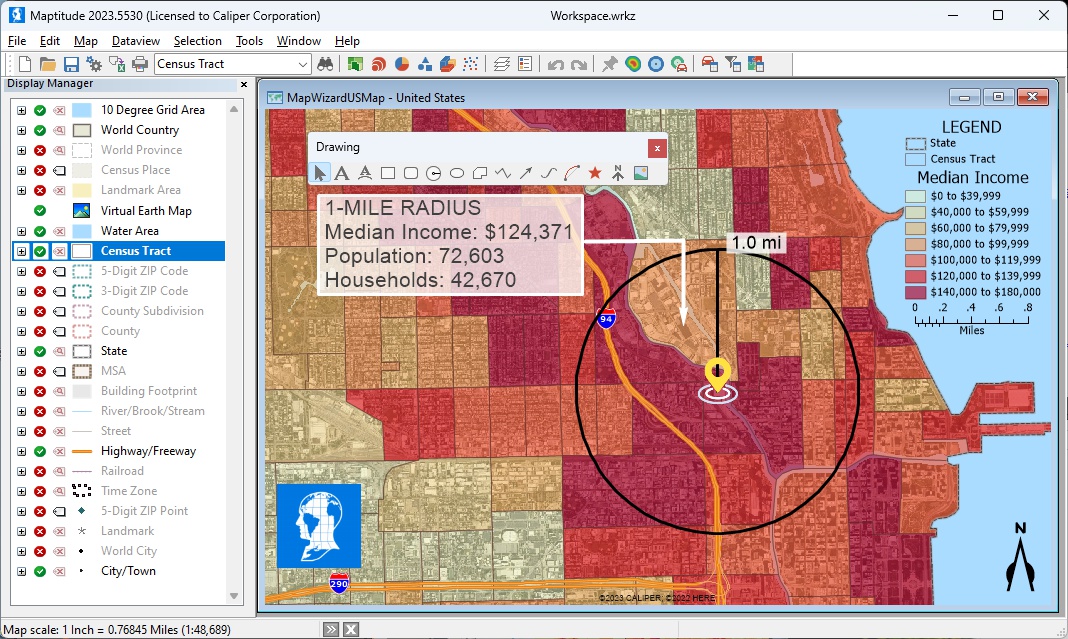
Maptitude desktop draws text, symbols, lines, circles, rectangles, polygons, and images over your layers, and all of it stays editable
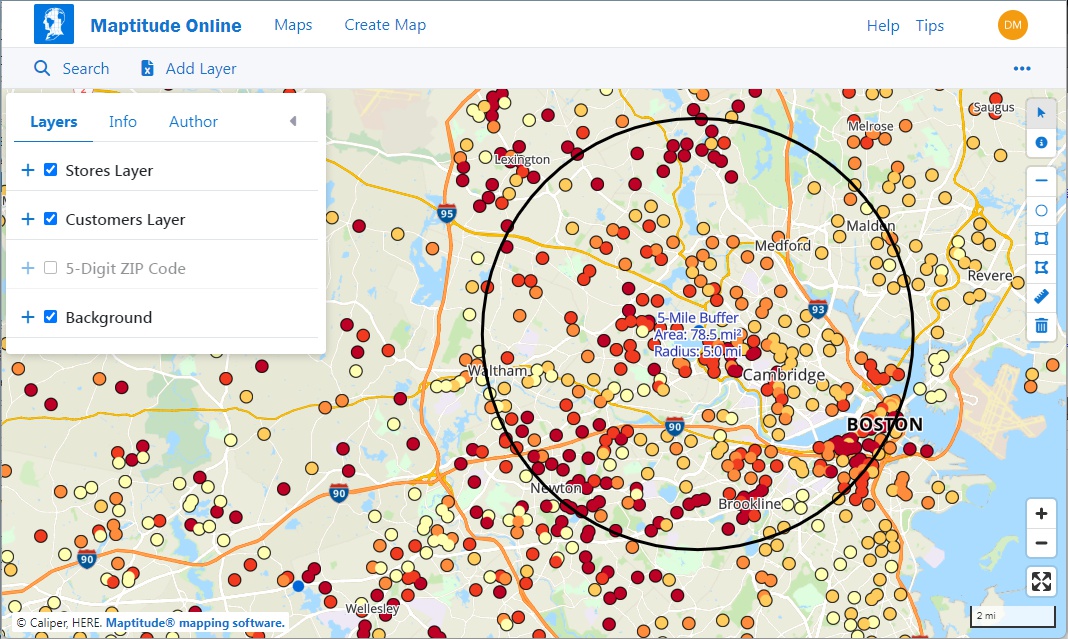
Maptitude Online draws lines, circles, rectangles, and polygons on any device, and shows line lengths and polygon areas as you draw
 |
“Our agency of 250 employees have 65+ offices scattered throughout Alabama. We have certainly gotten our money’s worth out of the software and have produced thousands of maps using Maptitude. It is an easy program to learn and draw with. It has been used over the years to help forest landowners manage their forestland.”
|
 |
“We purchased Maptitude for a yearly mapping project. We are a non-profit charitable organization and our volunteers deliver gift bags to all 930 member families. It was my task to map 85+ delivery routes to all member families in our local area. I was seeking a substitute for Microsoft Streets and Trips. Maptitude is like Streets and Trips on steroids. I think there is probably not much Maptitude can't do. There is a bit of a learning curve because it is so powerful. But I like the ability to customize the map points with a staggering array of colors and shapes. I can save the maps, make PDFs, optimize routing. Everything I need—plus. Thank you Maptitude.”
|

|
“Best Mapping software available. Exceeded our expectations. Provides clear maps with plenty of customization to tailor our maps to fit our clients' needs. Excellent drive-time mapping and very simple customer database plotting. Light years better than our previous mapping software.”
|
 |
“The program allows you to create beautiful maps effortlessly. The maps can be tweaked and customized to convey the information to your targeted audience. For me, this makes Maptitude an excellent visual communication resource.”
|
Learn how to use online map drawing tools or download Maptitude for sophisticated map editing.
To draw on this map:
 to draw a line. Click on a starting location, any
intermediate locations, and double-click to end the line
and see its length.
to draw a line. Click on a starting location, any
intermediate locations, and double-click to end the line
and see its length. to draw a circle. Click on a location, enter the radius,
choose units, and click OK, or click and drag on the map
until you see the desired radius.
to draw a circle. Click on a location, enter the radius,
choose units, and click OK, or click and drag on the map
until you see the desired radius. to draw a rectangle. Click on a starting location, move the
pointer an opposite corner, and click when the desire
dimensions are displayed.
to draw a rectangle. Click on a starting location, move the
pointer an opposite corner, and click when the desire
dimensions are displayed. to draw a polygon. Click on a starting location, any
intermediate locations, and double-click to close the
shape and see its polygon and dimensions.
to draw a polygon. Click on a starting location, any
intermediate locations, and double-click to close the
shape and see its polygon and dimensions.Source: Wikipedia – ArcGIS Pro
See Wikipedia for a current description of ArcGIS Pro.
For a current, independent description of ArcGIS Pro, see their profile on G2, and compare it to Maptitude: g2.com/compare/maptitude-vs-maptitude-online-vs-arcgis-pro →
Use the buttons below to get an independent AI comparison of Maptitude vs ArcGIS Pro:
Source: Wikipedia – Carto
See Wikipedia for a current description of Carto.
For a current, independent description of Carto, see their profile on G2, and compare it to Maptitude: g2.com/compare/maptitude-vs-maptitude-online-vs-carto →
Use the buttons below to get an independent AI comparison of Maptitude vs Carto:
Source: Wikipedia – Global Mapper
See Wikipedia for a current description of Global Mapper.
For a current, independent description of Global Mapper, see their profile on G2, and compare it to Maptitude: g2.com/compare/maptitude-vs-maptitude-online-vs-global-mapper →
Use the buttons below to get an independent AI comparison of Maptitude vs Global Mapper:
Source: Wikipedia – Google Earth Pro
See Wikipedia for a current description of Google Earth Pro.
For a current, independent description of Google Earth Pro, see their profile on G2, and compare it to Maptitude: g2.com/compare/maptitude-vs-maptitude-online-vs-google-earth-pro →
Use the buttons below to get an independent AI comparison of Maptitude vs Google Earth Pro:
Use the buttons below to get an independent AI comparison of Maptitude vs Google My Maps:
Source: Wikipedia – Mapbox Studio
See Wikipedia for a current description of Mapbox Studio.
For a current, independent description of Mapbox Studio, see their profile on G2, and compare it to Maptitude: g2.com/compare/maptitude-vs-maptitude-online-vs-mapbox →
Use the buttons below to get an independent AI comparison of Maptitude vs Mapbox Studio:
Use the buttons below to get an independent AI comparison of Maptitude vs MapChart:
Source: Wikipedia – MapInfo Professional
See Wikipedia for a current description of MapInfo Professional.
For a current, independent description of MapInfo Professional, see their profile on G2, and compare it to Maptitude: g2.com/compare/maptitude-vs-maptitude-online-vs-mapinfo-pro →
Use the buttons below to get an independent AI comparison of Maptitude vs MapInfo Professional:
Source: Wikipedia – QGIS
See Wikipedia for a current description of QGIS.
For a current, independent description of QGIS, see their profile on G2, and compare it to Maptitude: g2.com/compare/maptitude-vs-maptitude-online-vs-qgis →
Use the buttons below to get an independent AI comparison of Maptitude vs QGIS:
These four are worth knowing about. They cater to specific needs such as lightweight mapping, creative projects, or advanced geospatial analysis.
Source: Wikipedia – GRASS GIS
See Wikipedia for a current description of GRASS GIS.
For a current, independent description of GRASS GIS, see their profile on G2, and compare it to Maptitude: g2.com/compare/maptitude-vs-maptitude-online-vs-grass →
Use the buttons below to get an independent AI comparison of Maptitude vs GRASS GIS:
For a current, independent description of Mapline, see their profile on G2, and compare it to Maptitude: g2.com/compare/maptitude-vs-maptitude-online-vs-mapline →
Use the buttons below to get an independent AI comparison of Maptitude vs Mapline:
For a current, independent description of Scribble Maps, see their profile on G2, and compare it to Maptitude: g2.com/compare/maptitude-vs-maptitude-online-vs-scribble-maps →
Use the buttons below to get an independent AI comparison of Maptitude vs Scribble Maps:
For a current, independent description of ZeeMaps, see their profile on G2, and compare it to Maptitude: g2.com/compare/maptitude-vs-maptitude-online-vs-zeemaps →
Use the buttons below to get an independent AI comparison of Maptitude vs ZeeMaps:
These are common reasons organizations buy map drawing software, with examples made in Maptitude:
Open-source mapping tools such as QGIS can be powerful, and many organizations use them effectively. However, open-source tools and free online editors do not come with the commercial infrastructure that Maptitude provides as standard: a full-time development team with over 40 years of GIS experience, dedicated support staff rated 9.2 out of 10 for Quality of Support by G2 reviewers, commercial-grade street and demographic data, free training, and a fixed annual subscription that covers all updates and support with no added costs.
In 2026, the best map drawing software sets new benchmarks by empowering users to create visually striking maps with precision and creativity. Each tool on this list offers unique capabilities and features, allowing users to personalize their maps.
For those seeking a map drawing software that stands out in both map style customization and affordability, Maptitude costs $795 a year, with a free Country Package included.
Maptitude lowers the burden required for creating engaging and inspiring maps that allow you to leverage the value held within your data. By integrating with key geographic, demographic, and healthcare datasets, Maptitude provides a one-stop wizard-driven interface. Maps are an intuitive way to convey and analyze large amounts of data.
Use the AI comparison buttons above to compare Maptitude with any platform on this page.
Learn more about Maptitude to see how you and your team can benefit from mapping software!
Schedule a Free Personalized Demo
Drawing is one part of GIS, not a separate category. A drawing tool lets you add graphics to a map. A GIS also stores your data by location and analyzes it, so the thing you are annotating was produced from your own records rather than drawn from scratch. If the map only has to look right once, a drawing tool is enough. If it has to be rebuilt when the numbers change, you want the GIS underneath it.
Free online editors cost nothing and usually publish your map publicly. At the professional end, Maptitude costs $795 per user per year as a subscription or a one-time purchase, including a free Country Package worth $695, unlimited geocoding, and all updates and support. When comparing, check whether the basemap and demographic data are included or sold separately, because that is usually the larger number.
Yes. Several tools on this page are free, and the Maptitude Online trial and the 1-month desktop trial both cost nothing and need no credit card. Two things to check on any free tool: whether your map is public by default, and whether you can get the drawing back out in a format something else can read.
This is the question that separates presentation tools from cartographic ones, and it matters for planning notices, hearing exhibits, and anything going into a public record. Maptitude prints at any paper size with fixed-scale and actual-point-size options, builds page layouts with snap grids, rulers, and margins, and exports images at adjustable resolution.
It depends on the tool, and it is worth asking before you buy. Some assume a trained cartographer. Maptitude is built for business users: Maptitude Create-a-Map Wizard takes you from a spreadsheet to a finished map in a few steps, labels place themselves, and legends and scale bars generate automatically. Free tutorials, training, and webinars are available if you want them.
Yes. Both editions include drawing tools. Desktop Maptitude has the larger toolkit. Maptitude Online covers the shapes most people need, in a web browser with nothing to install.
Desktop Maptitude drawing tools:
Maptitude Online drawing tools:
Try the drawing tools on the Maptitude Online map on this page, or test both editions free for 30 days: the Maptitude desktop trial and the Maptitude Online trial.
That depends on your requirements, so the more useful answer is to point you at the independent rankings rather than our own. Leading software review platforms consistently place Maptitude at or near the top for GIS and mapping:
• The 2026 G2 buyer's guide
• SourceForge
• SoftwareReviews
• Capterra
• G2
Or use the AI comparison buttons beside any platform on this page to check it against your own requirements.

 Check out our G2 Reviews
Third-party trademarks are used for identification and descriptive purposes and do not imply affiliation or endorsement. See Third-Party Trademarks.


Home | Products | Contact | Secure Store
 Call Us


